

There’s nothing quite as annoying as that little amber horseshoe-shaped light glaring at you from your dashboard every single time you start your Honda Civic.
You’ve already checked the tires. You’ve already added air. But the light just won’t go away.
I’ve been there more times than I’d like to admit — and after working with Honda Civics spanning from the 8th generation all the way through the current 11th generation, I’ve learned every trick in the book to kill that stubborn TPMS warning light for good.
- The TPMS light on a Honda Civic means your tire pressure is too low, too high, or the system itself has a malfunction.
- First, always check and adjust all four tires (plus the spare) to the recommended PSI found on your driver’s door jamb sticker.
- For most Civics, the light resets automatically after driving for a few minutes at 28+ mph with correct pressures.
- If it doesn’t, use the TPMS calibration button or the infotainment system to manually reset.
- A blinking TPMS light means a sensor malfunction — that’s a different problem that may need professional help.
- Replacement TPMS sensors cost $30–$80 each, and reprogramming typically runs $25–$50 per tire at a shop.
Liked this article?
Add TireAdvise as a preferred source so you see more of our tire reviews and guides on Google.
Why Your Honda Civic’s Tire Pressure Light Comes On
Before I walk you through the reset process, I think it’s important to understand why the light turned on in the first place. In my experience, jumping straight to “how do I turn it off” without understanding the cause leads to the light coming right back on — or worse, driving on dangerously underinflated tires.
The TPMS (Tire Pressure Monitoring System) in your Honda Civic uses sensors mounted inside each wheel to continuously monitor air pressure. When any tire drops roughly 25% below the manufacturer’s recommended PSI, the system triggers that warning light.
Here are the most common reasons I’ve seen it activate:
- Temperature drops: This is the number one cause I encounter, especially during fall and winter in the US. For every 10°F drop in ambient temperature, your tires lose about 1 PSI. A cold snap can easily trigger the light overnight.
- Slow leak: A nail, screw, or damaged valve stem causing a gradual air loss. I’ve pulled screws out of tires that were losing just 1–2 PSI per week — enough to eventually trip the sensor.
- Recently filled or rotated tires: If you just had your tires rotated or filled to a different pressure, the system may need recalibration.
- New tires or wheels installed: Aftermarket wheels or new tires often require TPMS relearning.
- Dead or failing TPMS sensor battery: These sensors have batteries that last roughly 5–10 years. If your Civic is getting up there in age, the sensors themselves might be dying.
- Spare tire is low: Many people don’t realize that some Honda Civics have a TPMS sensor in the spare tire. If that spare is flat, it can trigger the light.
Step 1: Check and Correct Your Tire Pressure (Don’t Skip This)
I know you want to jump straight to the reset procedure, but trust me on this — the TPMS light exists for a safety reason. Every single time I’ve helped someone reset their TPMS light, I start by checking the actual tire pressure first.
Here’s what I do:
Find Your Recommended PSI
Open your driver’s side door and look at the sticker on the door jamb. On most Honda Civics, the recommended pressure is 32 PSI for all four tires, though some model years and trim levels call for 33 or 35 PSI. Do NOT use the number printed on the tire sidewall — that’s the maximum pressure rating, not the recommended operating pressure.
I can’t stress this enough: I’ve seen people inflate their tires to 44 PSI because that’s what the sidewall said, and then wonder why the ride felt harsh and the center of their tread was wearing prematurely.
Check All Four Tires Plus the Spare
Use a quality digital tire pressure gauge. I personally use a simple $10 Accutire gauge from Amazon, and it’s been dead-on accurate compared to calibrated shop gauges I’ve tested it against.
Check the pressure when the tires are cold — meaning the car has been parked for at least three hours or driven less than a mile. Warm tires read higher and will give you a false reading.
Inflate or Deflate as Needed
If any tire is low, fill it to the exact PSI listed on your door jamb sticker. If any tire is overinflated (this happens more than you’d think after a visit to a quick-lube shop), let some air out until it matches.
Don’t forget to check the spare tire if your Civic has one. On several occasions, I’ve tracked a persistent TPMS light down to a completely flat spare sitting in the trunk well.
Step 2: Drive the Car (The Automatic Reset)
Here’s the good news — on most Honda Civics, particularly 2012 and newer models with direct TPMS, the light will reset itself automatically once the pressures are corrected.
After I fill the tires to the proper PSI, I typically drive the car at speeds above 28 mph for about 15–20 minutes. In my experience, the light usually turns off within that window. On some occasions, it took a full drive cycle — meaning I had to drive it, park it, and start it again the next morning before the light cleared.
If the light goes off during your drive, you’re done. No further action needed.
But if the light stubbornly stays on even after you’ve verified the pressures are correct and driven the car for a reasonable period, move on to the manual reset methods below.
Step 3: Manual TPMS Reset Methods by Honda Civic Generation
This is where things get generation-specific. Honda has used slightly different TPMS systems over the years, so the reset procedure depends on which Civic you’re driving. I’ve personally worked through each of these methods, and I’ll walk you through them one by one.
2006–2011 Honda Civic (8th Generation) — TPMS Button Method
The 8th-gen Civic uses an indirect TPMS system, which means it doesn’t have individual pressure sensors in each wheel. Instead, it uses the ABS wheel speed sensors to detect pressure differences. This system requires manual calibration after tire pressure adjustments.
Here’s the process I follow:
- Make sure all tires are inflated to the correct PSI.
- Turn the ignition to the “ON” position (engine doesn’t need to be running). On push-button start models, press the start button twice without pressing the brake pedal.
- Locate the TPMS calibration button. On most 8th-gen Civics, it’s located to the left of the steering wheel, below the dashboard. It’s a small, recessed button — you might need to look closely or feel around for it.
- Press and hold the TPMS button until the TPMS indicator light blinks twice.
- Release the button. The calibration process has started.
- Drive the car at highway speeds for about 30 minutes. The system will recalibrate during this drive.
I want to be honest — on the 8th-gen Civic, the recalibration can take a while. On one occasion, the light didn’t clear until I had driven the car regularly over the course of a couple of days. Be patient with this generation.
2012–2015 Honda Civic (9th Generation) — TPMS Button Method
The 9th-gen Civic switched to a direct TPMS system with sensors inside each wheel. However, Honda still included a calibration button on many trims.
My procedure:
- Verify all tire pressures are correct.
- Turn the vehicle to the “ON” position.
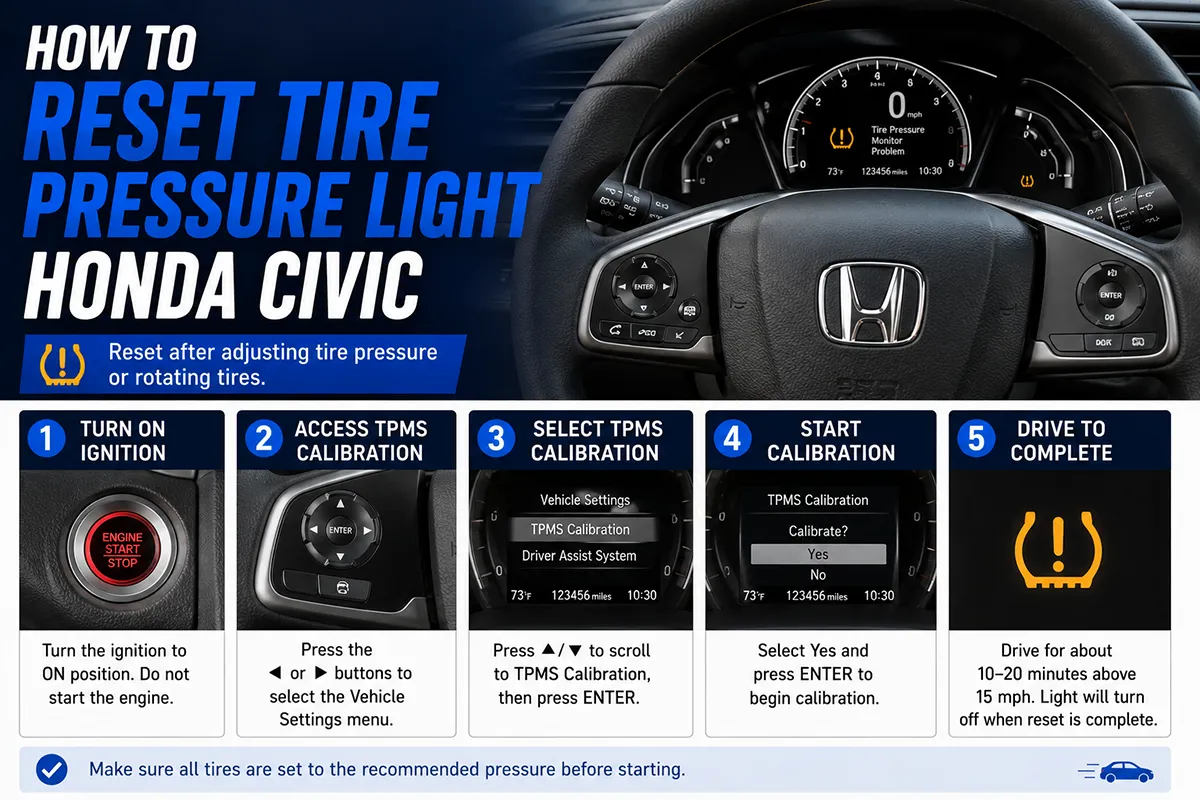
- Navigate to the vehicle settings on the information display (the small screen between the gauges) using the steering wheel controls.
- Select TPMS Calibration.
- Select Calibrate or Initialize.
- Press and hold the button to confirm.
- Drive the vehicle normally. The system should reset within 30 minutes of driving.
On some 9th-gen trims, there’s still a physical TPMS button below the dash. If you can find it, the press-and-hold method from the 8th generation works the same way.
2016–2021 Honda Civic (10th Generation) — Infotainment/Settings Method
The 10th-gen Civic is the one I’ve spent the most time with, and resetting the TPMS on this generation is straightforward once you know where to look.
- Make sure all tires are at the correct PSI.
- Press the Home button on the touchscreen infotainment system.
- Select Settings (the gear icon).
- Select Vehicle.
- Select TPMS Calibration.
- Select Calibrate.
- The system will confirm calibration has started.
- Drive the car at highway speeds for about 30 minutes to complete the process.
On the non-touchscreen models (typically the LX trim), you’ll use the steering wheel buttons to scroll through the Driver Information Interface (the screen between the tachometer and speedometer). Navigate to Vehicle Settings > TPMS Calibration > Calibrate.
In my experience with the 10th-gen, this method works reliably every time — as long as the tire pressures are actually correct before you start.
2022–Present Honda Civic (11th Generation) — Infotainment Method
The newest Civic uses essentially the same process as the 10th generation, but the menu layout is slightly different due to the updated infotainment system.
- Confirm all tire pressures match the door jamb specification.
- From the home screen, tap Settings.
- Tap Vehicle.
- Tap TPMS Calibration.
- Tap Calibrate.
- Drive normally for approximately 30 minutes.
I recently went through this process on a 2023 Civic Sport, and the light cleared after about 20 minutes of mixed city and highway driving. Super straightforward.
Comparison of TPMS Reset Methods by Civic Generation
| Civic Generation | Years | TPMS Type | Reset Method | Approx. Reset Time |
|---|---|---|---|---|
| 8th Gen | 2006–2011 | Indirect | Physical TPMS button below dash | 30 min – 2 days |
| 9th Gen | 2012–2015 | Direct | Info display or physical button | 20–30 min |
| 10th Gen | 2016–2021 | Direct | Touchscreen or steering wheel menu | 15–30 min |
| 11th Gen | 2022–Present | Direct | Touchscreen infotainment menu | 15–25 min |
What If the TPMS Light Is Blinking (Flashing)?
This is a critical distinction that I want to make sure you understand, because a solid TPMS light and a flashing TPMS light mean very different things.
A solid TPMS light means one or more tires are at an incorrect pressure. This is the easy fix — adjust your pressures and reset.
A flashing/blinking TPMS light (typically flashes for 60–90 seconds when you start the car, then stays solid) means there’s a malfunction in the TPMS system itself. This usually indicates a dead sensor, a damaged sensor, or a communication problem between the sensor and the car’s computer.
When I encounter a flashing TPMS light, the calibration reset method won’t fix it. Here’s what I check:
- Sensor battery life: TPMS sensor batteries are not replaceable — when they die, you need a new sensor. If your Civic is older than 7–8 years and you’ve never replaced the sensors, this is likely the culprit.
- Aftermarket wheels: If you’ve installed aftermarket wheels without transferring or reprogramming the TPMS sensors, the system won’t communicate properly.
- Recent tire service: Occasionally, a careless tire technician can damage a TPMS sensor during mounting. I’ve seen it happen at discount tire shops more than once.
- Corroded valve stems: On sensors with metal valve stems, corrosion can cause signal issues.
For a flashing TPMS light, I recommend taking your Civic to a Honda dealership or a reputable tire shop that has a TPMS diagnostic tool. They can scan each sensor to determine which one has failed.
How Much Does It Cost to Replace a TPMS Sensor on a Honda Civic?
Since I’ve replaced several TPMS sensors across different Civic generations, I can give you a realistic breakdown of what to expect.
OEM Honda TPMS sensors typically run $35–$80 per sensor, depending on the generation. I usually order them from reputable online Honda parts retailers for the lower end of that range. Buying directly from the dealership parts counter tends to be pricier.
Aftermarket TPMS sensors from brands like Dorman, Standard Motor Products, or ATEQ run $20–$50 per sensor. I’ve used Dorman sensors on older Civics and they’ve worked reliably.
Labor for installation and programming typically adds $25–$50 per sensor if you have a shop do it. The sensor needs to be mounted inside the tire (which means dismounting and remounting the tire), and then the new sensor ID needs to be registered to the car’s TPMS module.
If you’re replacing all four sensors at once — which I generally recommend if one has died, since the others are the same age and likely to follow suit soon — you’re looking at roughly $200–$400 total including parts and labor at an independent shop. A dealership might charge $400–$600 for the same job.
Common Mistakes I See People Make When Resetting the TPMS Light
Over the years, I’ve seen (and made) just about every TPMS-related mistake there is. Here are the most common ones:
1. Only Checking Three Tires
It sounds obvious, but I’ve watched people check the front two tires and one rear tire, then walk away. Always check all four. And the spare. Every time.
2. Using an Old or Inaccurate Gauge
Cheap stick-type gauges lose accuracy over time. I switched to a digital gauge years ago and have never looked back. A $10–$15 digital gauge from a reputable brand pays for itself immediately.
3. Checking Pressure When Tires Are Hot
If you’ve been driving for 30 minutes and then check your tire pressure at a gas station, you’ll get a reading that’s 3–5 PSI higher than the true cold pressure. Always check first thing in the morning or after the car has been sitting for several hours.
4. Inflating to the Wrong PSI
I mentioned this earlier, but it bears repeating: use the door jamb sticker specification, NOT the number on the tire sidewall. The sidewall number is the maximum rated pressure for the tire, not the recommended operating pressure for your specific vehicle.
5. Not Driving After Calibration
The TPMS calibration process requires you to actually drive the car. I’ve had people text me saying the light is still on after they hit “Calibrate” — and it turned out they just left the car parked in their driveway. You need to drive at speeds above 28 mph for at least 15–30 minutes for the system to complete its learning cycle.
6. Ignoring the Light Entirely
This one genuinely worries me. Some drivers put a piece of tape over the light or just learn to ignore it. Underinflated tires affect braking distance, handling, and fuel economy — and in extreme cases, they can cause blowouts. The TPMS light exists because tire-related accidents were a significant safety concern, and the TREAD Act of 2000 mandated these systems in all US vehicles sold after 2007 for good reason.
Seasonal Tips for Managing TPMS on Your Honda Civic
Living in the US means dealing with significant temperature swings depending on where you are, and temperature is the single biggest factor in TPMS light activations.
Fall and Winter
When temperatures drop from summer highs of 85°F to fall lows of 45°F, that’s a 40-degree swing. At roughly 1 PSI lost per 10°F, your tires could lose 4 PSI just from the weather change — easily enough to trigger the TPMS light.
I make it a habit to check all four tires on the first cold morning of the season. Topping them off in October or November usually prevents a surprise TPMS light on a frosty morning.
Spring and Summer
The reverse happens when it warms up. Tires that were set to 32 PSI in January might read 36 PSI in July. While overinflation doesn’t typically trigger the TPMS light (unless it’s significantly over), it does cause uneven center-strip tread wear and a harsher ride.
I recommend rechecking pressures when the seasons shift, roughly twice a year. It takes five minutes and saves you from premature tire replacement.
When to Seek Professional Help
I’m all for DIY solutions — it’s one of the reasons I started writing about tires and vehicle maintenance in the first place. But there are situations where I’d absolutely recommend visiting a professional:
- The TPMS light flashes at startup then stays solid: This indicates a system malfunction, not just a low tire. A shop with a TPMS diagnostic tool can identify which sensor has failed.
- The light comes back on within a day or two of resetting: You likely have a slow leak. A tire shop can submerge the tire in water to find the exact leak point.
- You’ve recently installed new wheels or tires: New TPMS sensors need to be programmed to your Civic’s ECU. Most shops include this in the tire installation cost, but if it wasn’t done properly, you’ll need it redone.
- Your Civic is older than 8 years and sensors haven’t been replaced: It’s probably time for new sensors, which is best handled during your next tire change to avoid double-paying for tire dismounting.
For sensor replacement and programming, I’ve had consistently good experiences at Discount Tire (free TPMS inspections), Costco Tire Center (if you bought tires there), and local independent tire shops. Honda dealerships can certainly do the work, but they tend to charge a premium.
Quick Reference: Your TPMS Reset Checklist
Here’s a simplified checklist I keep in my phone for whenever I deal with a TPMS light — on my own car or when helping a friend. Feel free to screenshot this for your own use:
- ☐ Check all four tires AND the spare with a reliable digital gauge
- ☐ Compare readings to the PSI on the driver’s door jamb sticker
- ☐ Inflate or deflate each tire to match the recommended PSI exactly
- ☐ Drive the car at 28+ mph for 15–30 minutes
- ☐ If light persists, initiate TPMS calibration through the infotainment system or physical button
- ☐ Drive again for 15–30 minutes after calibration
- ☐ If the light STILL won’t turn off or is flashing, visit a tire shop or Honda dealer
My Final Thoughts on Honda Civic TPMS
After spending years working with Honda Civics across multiple generations, I can tell you that Honda’s TPMS system is generally reliable and straightforward to work with. The calibration process is simpler than many other brands — Toyota, for example, often requires a more involved relearn procedure, and some GM vehicles need a specialized TPMS activation tool.
The key takeaway I want to leave you with is this: the TPMS light is not your enemy. It’s telling you something important about your tires. Take the two minutes to check your pressures, correct them if needed, and then reset the system. Your tires will last longer, your fuel economy will be better, and — most importantly — your car will handle the way it was designed to in an emergency situation.
If you’re in the market for new tires for your Honda Civic, make sure the shop includes TPMS sensor inspection and reprogramming in their installation package. Most reputable shops do, but it never hurts to ask upfront.
And if your TPMS sensors are approaching the end of their battery life, consider replacing them all at once when you get your next set of tires installed. It’s the most cost-effective time to do it since the tires are already being dismounted.
Stay safe out there, keep those pressures in check, and don’t ignore the little amber light. It’s doing its job — and now you know exactly how to respond when it does.
Frequently Asked Questions
How do I reset the tire pressure light on a Honda Civic?
To reset the TPMS light on most Honda Civic models (2016 and newer), press the Home button on your infotainment screen, go to Settings > Vehicle, and select TPMS Calibration > Calibrate. For older models, locate the TPMS reset button below the steering column, turn the ignition to ON without starting the engine, and hold the button until the light blinks twice. Make sure all four tires are properly inflated to the recommended PSI listed on the driver’s door jamb before resetting.
Why is my Honda Civic tire pressure light still on after filling tires?
If your TPMS light stays on after inflating your tires to the correct pressure, you likely need to manually recalibrate the system by driving for 20-30 minutes at highway speed or performing the reset through your vehicle settings. In some cases, the TPMS sensor itself may be faulty or the battery inside the sensor has died, which typically happens after 5-10 years. Replacement TPMS sensors for a Honda Civic usually cost $30-$80 per sensor, plus installation if you’re not doing it yourself.
What is the correct tire pressure for a Honda Civic?
Most Honda Civic models recommend 32-35 PSI for all four tires, though the exact specification varies by model year and trim level. I always recommend checking the tire placard on the inside of your driver’s side door jamb rather than relying on the number stamped on the tire sidewall, which is the maximum pressure, not the recommended pressure. Keeping your tires at the correct PSI improves fuel economy, extends tire life, and ensures your TPMS light stays off.
Can I drive my Honda Civic with the tire pressure light on?
You can drive short distances with the TPMS light on, but I wouldn’t recommend ignoring it for long. A solid TPMS light means at least one tire is significantly underinflated, which increases blowout risk, wears your tires unevenly, and hurts fuel economy — especially dangerous on US highways at high speeds. A flashing TPMS light that then stays solid usually indicates a sensor malfunction, which you should get diagnosed at a tire shop or Honda dealer.
Do I need to reset the TPMS after putting new tires on my Honda Civic?
Yes, you should always recalibrate the TPMS after installing new tires or rotating your existing tires on a Honda Civic. Honda uses an indirect TPMS system on most Civic models, which learns your tire size through wheel speed sensors, so new tires with slightly different dimensions need a fresh calibration. Most tire shops like Discount Tire, Tire Rack, or your local Honda dealer will perform the TPMS reset as part of the installation, but you can easily do it yourself through the infotainment settings.
Does cold weather cause the Honda Civic tire pressure light to come on?
Absolutely — this is one of the most common reasons Honda Civic drivers in the US see the TPMS light during fall and winter. Tire pressure drops about 1 PSI for every 10°F decrease in temperature, so a cold overnight dip can easily push your tires below the TPMS threshold. I recommend checking your tire pressure with a handheld gauge when the tires are cold, topping them off to the recommended PSI, and then performing a TPMS recalibration if the light doesn’t turn off after a few minutes of driving.
How much does it cost to fix a TPMS sensor on a Honda Civic?
Replacing a single TPMS sensor on a Honda Civic typically costs between $50 and $150 including parts and labor at a US tire shop or dealership. If you’re already buying new tires, many shops like Discount Tire or America’s Tire offer discounted sensor replacement when bundled with tire installation. OEM Honda sensors run $40-$80 each, while quality aftermarket options from brands like Dorman or ATEQ can be found for $25-$50, making it an affordable fix if your sensor battery has died.
